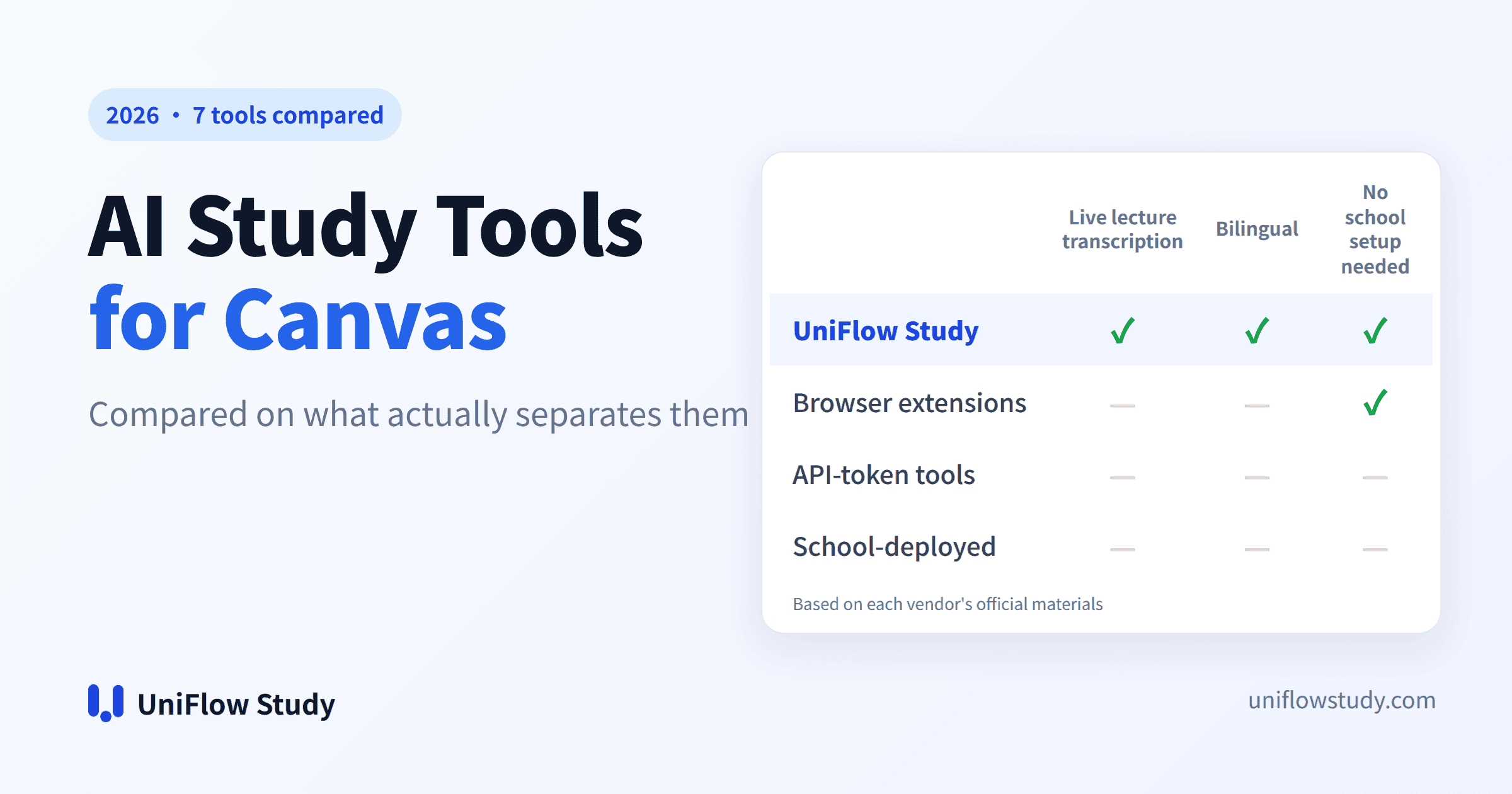
There are seven main AI study tools that work with Canvas today: UniFlow Study, AskSia, Polya, Syla, Coursi, StudyFetch, and Instructure's own Project Athena.
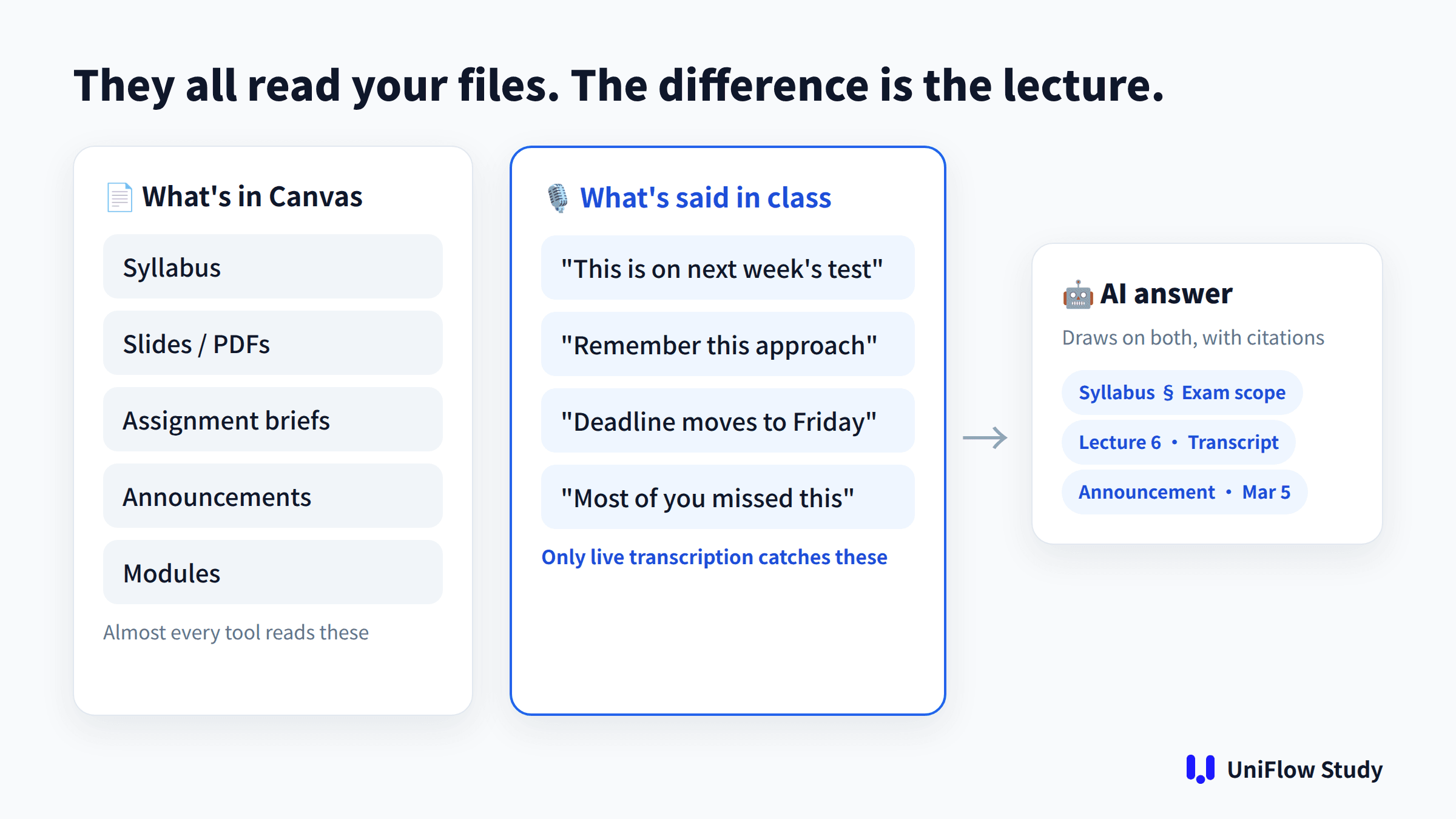
They can all read the files and assignments in your Canvas, so that part barely separates them. Three things do:
- Can it capture what your professor says in class? A lot of exam hints are only ever said out loud.
- Does it still work if your school blocks API tokens?
- Does it help you understand the lecture, not just summarize it? For international students, live transcription and translation are the difference.
Quick answer
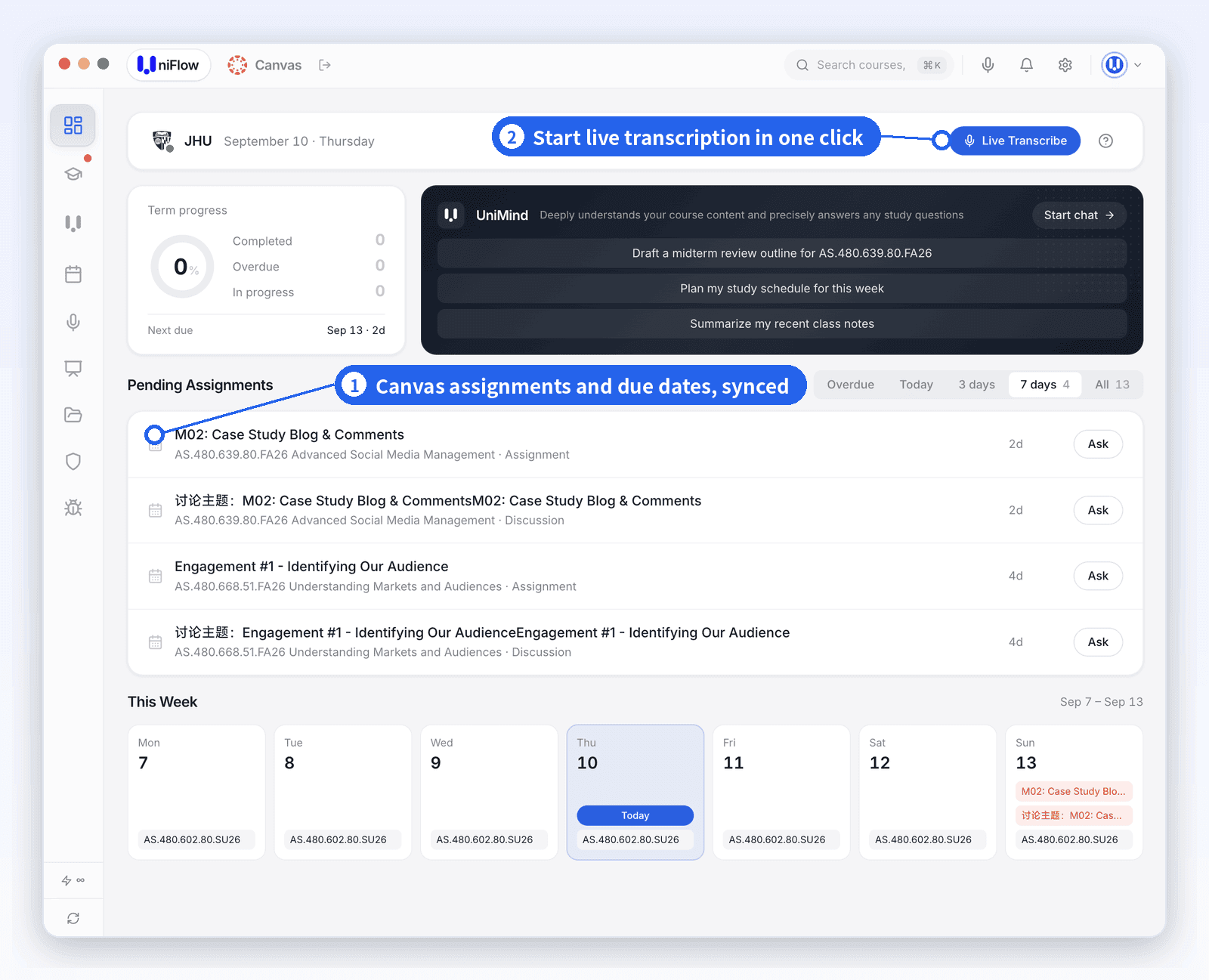
- Lectures are hard to follow, or your professor gives key points only in class: UniFlow Study. It transcribes lectures live with bilingual translation, then answers questions from both the lecture and your Canvas materials, with citations.
- Your school already offers an AI tool inside Canvas: use it first. It's free.
- You only need help with course files, in the browser: a browser extension such as AskSia.
- Your school allows API tokens and you want citations down to the PDF page: a token-based tool such as Polya.
- You want to stay inside ChatGPT: a bridge extension such as Syla. These tools are still very new.

Comparison 1: the three things that matter
| Tool | Live lecture transcription | Bilingual translation | Works if tokens are blocked |
|---|---|---|---|
| UniFlow Study | ✅ Live, and transcripts feed the AI's answers | ✅ Real-time bilingual (e.g. English–Chinese) | ✅ Built-in browser login, no token or extension |
| AskSia | Live lecture transcription in the product; Canvas extension imports recordings | Real-time translation in the product | ✅ Browser extension |
| Polya | Reads recordings already posted to Canvas (none if your professor doesn't upload them) | No official mention found | ❌ Needs a personal API token |
| Syla | No official mention found | No official mention found | ✅ Browser extension |
| Coursi | No official mention found | No official mention found | ❌ Needs a personal API token |
| StudyFetch (institutions) | No mention found for the institutional product | No official mention found | Requires school deployment |
| Project Athena | No official mention found | No official mention found | ✅ Official connection |
← Swipe to see the full table →
"No official mention found" means we couldn't find it on the vendor's site or announcements. It doesn't prove the feature is missing. If something has changed, let us know.
Comparison 2: connection, content and price
| Tool | How it connects | What it reads (per the vendor) | School approval? | Price (verified Sept 2026) |
|---|---|---|---|---|
| UniFlow Study | Desktop app with built-in browser | Courses, assignments, announcements, discussions, modules, grades, syllabus, files + live lecture transcription | No | Free plan; paid from $16/mo (20% off yearly) |
| AskSia | Chrome extension | Modules, files, assignments, pages, syllabus, recordings | No | Free tier for students |
| Polya | Personal API token | Readings, slides, pages, Canvas lecture transcripts | No, but your school must allow tokens | Free to start |
| Syla | Chrome extension + MCP to ChatGPT / Claude | Lectures and deadlines | No | 1 course free; Pro $7.99/mo |
| Coursi | Personal API token (iOS) | Assignments, announcements, grades, files, syllabus | No, but your school must allow tokens | 20 free messages/mo; paid from $10/mo |
| StudyFetch (institutions) | School LTI | Course materials your school connects | Yes | Bought by the school |
| Project Athena | Official read-only Canvas connection | Course content | Depends on your school | Listed at $5/mo |
← Swipe to see the full table →
Why "what's said in class" matters
- Exam hints are often verbal. "This will be on the midterm" or "remember this approach" rarely makes it into the slides or an announcement. An AI that only reads Canvas files can't tell you what your professor said to study, because it never heard it.
- Recordings aren't guaranteed. Tools that read lecture recordings depend on your professor posting them to Canvas. Many courses have no recordings, or post them days later.
- Understanding beats having the files. Fast speech, accents and jargon are the most common struggle for international students. Live transcription with translation fixes "I didn't catch that" during class, not the night before the exam.
UniFlow Study shows the original English and a translation side by side as you listen. After class, the transcript sits next to your Canvas materials. Ask "What's on the midterm?" and you get an answer built from the syllabus exam scope, your professor saying "this will definitely be on the test" in Lecture 6, and the March 5 announcement, with each source cited.
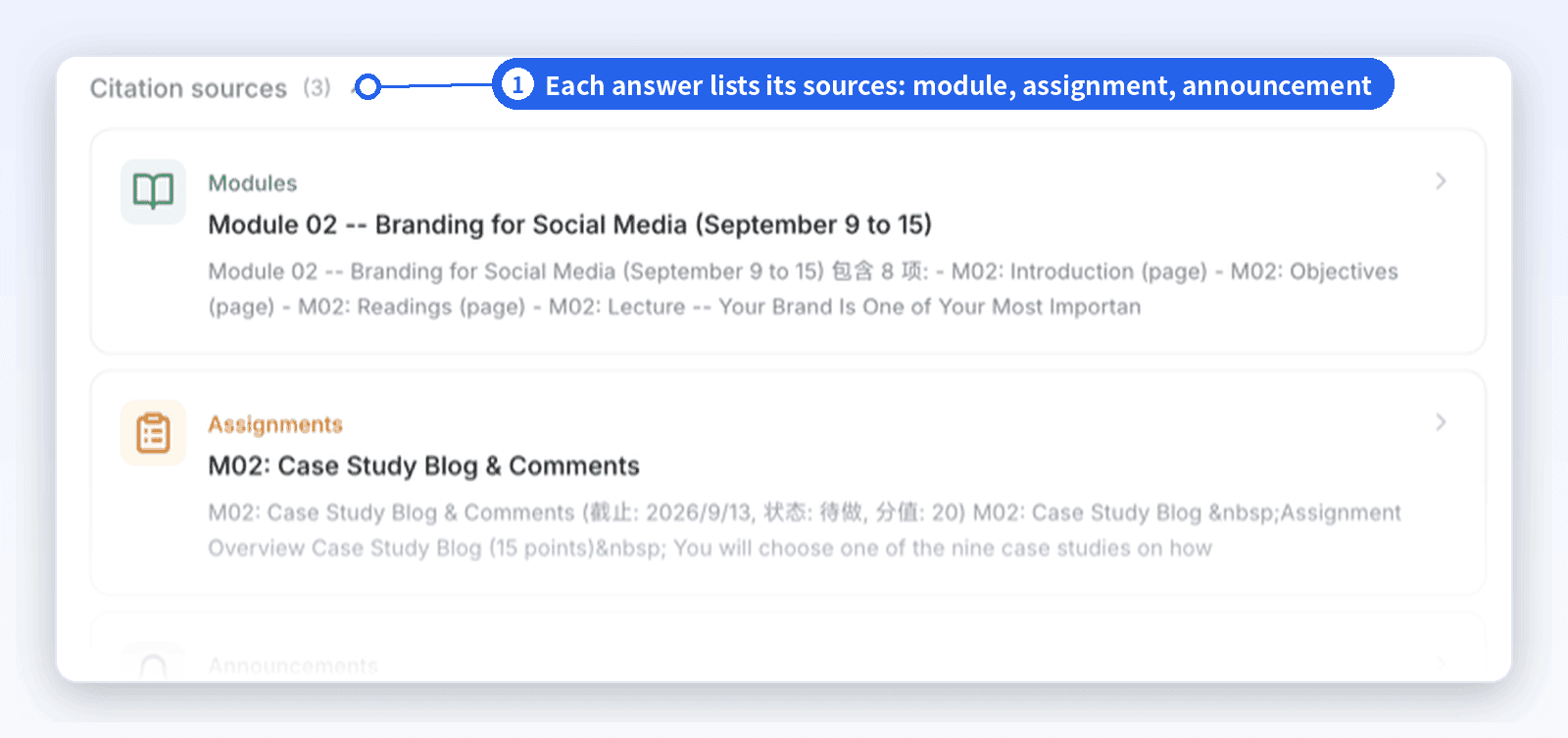
Here's a real example: asked when the M02 Case Study Blog is due, UniMind answered and listed the sources it used — the module, the assignment brief and an announcement.
The five ways tools connect to Canvas
1. Desktop app with a built-in browser (UniFlow Study)
Install the app on Mac or Windows and log in to Canvas through its built-in browser. Your school's SSO and Duo work as usual.
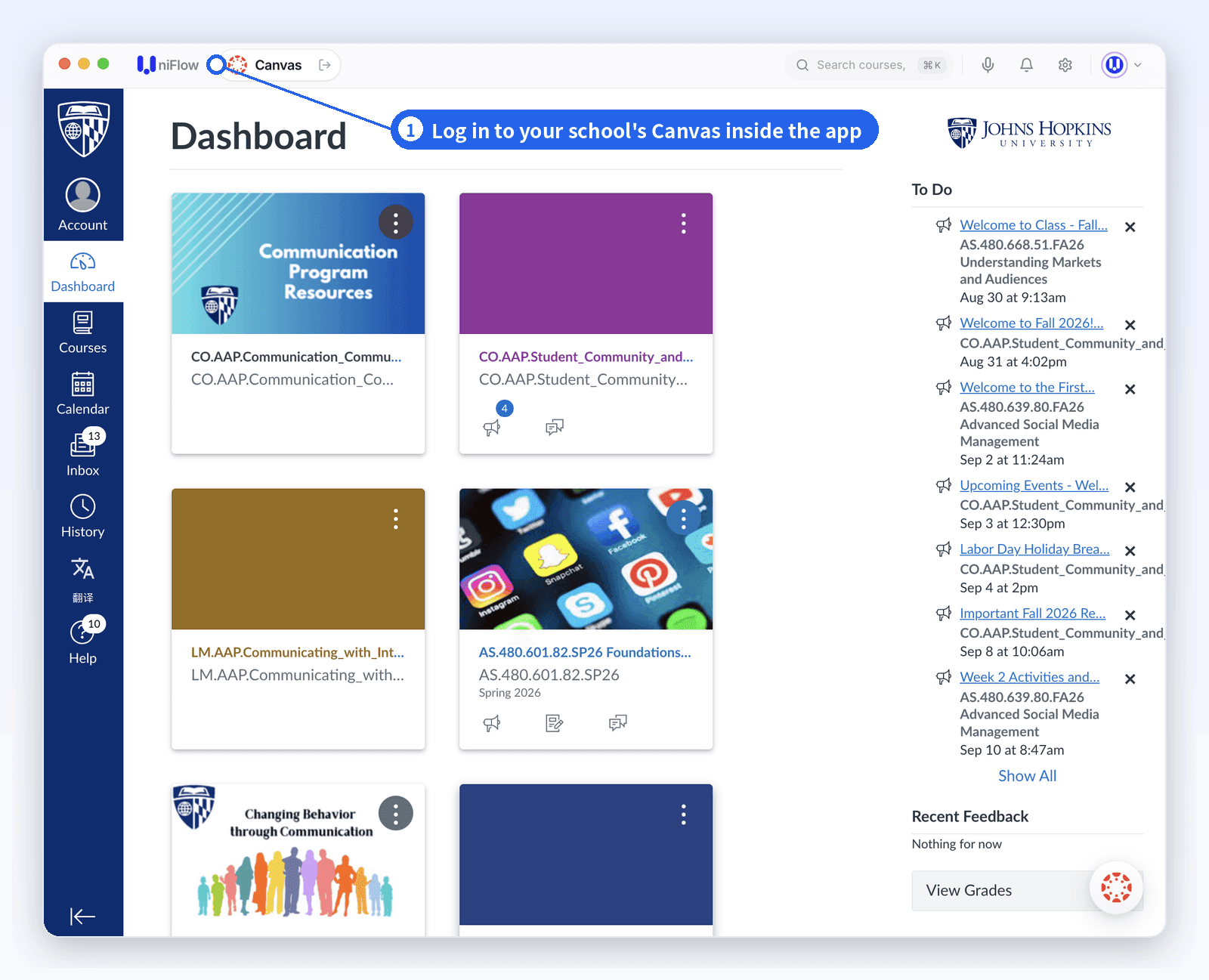
- Pros: no token, no extension, no school approval, so school token restrictions don't affect it. Lecture transcripts and every course live in one place. See what syncs.
- Best for: students who want all their courses in one place, especially international students who need transcription and translation.
- Not for: students who study only on a phone or tablet. It's desktop-only for now.
2. Browser extensions (AskSia, Syla)
A Chrome extension reuses your logged-in Canvas session and syncs what you can see.
- Pros: works right away, no school approval.
- Limits: the Canvas extension is browser-only; AskSia documents live transcription and translation in its product and institution pages, while Syla's site does not. Syla launched in August 2026.
3. Personal API tokens (Polya, Coursi, open-source MCP)
You generate an access token in Canvas and give it to the tool, which pulls your data through the Canvas API.
- Pros: structured data, with citations down to the page.
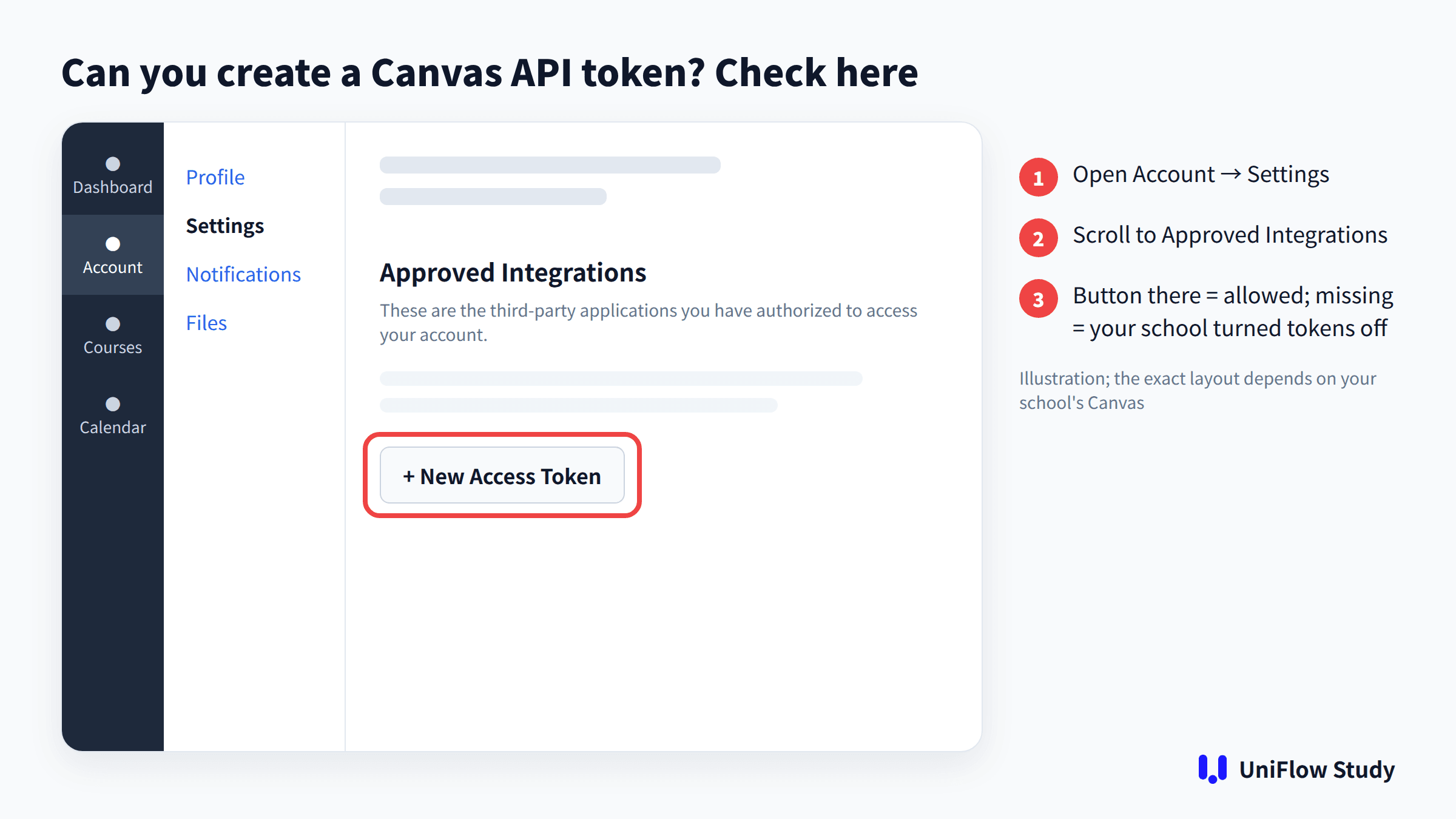
- Limits: many schools don't let students create tokens; Texas A&M says they're not available to students. A token is also effectively a key to your account. To check whether your school allows them:
- In Canvas, open Account → Settings.
- Scroll to Approved Integrations and look for + New Access Token.
- If the button is missing or you get a permissions error, your school has turned tokens off.
4. School-deployed tools (StudyFetch for institutions, Gemini LTI, Claude LTI)
Your school installs the tool inside Canvas and instructors turn it on.
- Pros: vetted by your school.
- Limits: it isn't your call. Ohio State's CarmenCanvas AI assistant, for example, is still a pilot and is switched on by instructors.
5. Canvas's own AI for students (Project Athena, IgniteAI)
- Project Athena: an "AI study coach" Instructure announced on July 22, 2026. It connects read-only and is listed at $5 a month. Instructure describes it as still in development and aimed mainly at schools.
- IgniteAI Study Tools: turns course pages into summaries, quizzes and flashcards, but your school has to enable it.
Three checks before you connect anything to Canvas
- Does it ask for your Canvas password? It shouldn't. UniFlow Study never stores your Canvas password.
- Can it write to Canvas, like submitting work or posting?
- Where is your data stored, is it used for training, and can you delete it? UniFlow Study caches course data on your computer and syncs it to the cloud with row-level security, so only you can access it. It isn't used to train AI models.
AI rules differ by course, so check the AI policy in each syllabus.
FAQ
QWhat's the difference between UniFlow Study and AskSia?
Both read your Canvas materials, and neither needs school approval. UniFlow Study is a desktop app that transcribes lectures live with bilingual translation, so its answers can cite what your professor said in class. AskSia is a browser extension for Canvas imports, and its product also documents live lecture transcription and translation.
QDoes Canvas have an AI assistant for students?
It depends on your school. IgniteAI Study Tools must be switched on by your school, and Project Athena is a paid product aimed mainly at schools. Otherwise, students use a third-party tool.
QCan ChatGPT access Canvas?
Not directly. As of this writing, there's no official Canvas connector in the ChatGPT or Claude directories. See How to Connect Canvas LMS to ChatGPT.
QMy school blocks API tokens. What can I use?
Three types don't need a token: browser extensions, desktop apps with a built-in browser (like UniFlow Study), and tools your school deploys.
QIs using these tools against the rules?
It depends on your school and course. The AI policy in your syllabus is the final word.
Sources
Product details come from these official pages, each checked on September 11, 2026. We didn't score or rank other products.
- AskSia Canvas extension
- Polya
- Syla
- Coursi
- StudyFetch for institutions
- Project Athena announcement · Athena site
- IgniteAI Study Tools guide
- Texas A&M token policy
- Ohio State CarmenCanvas AI assistant
Changelog: September 11, 2026 — first published.
Missing what's said in class? Download UniFlow Study free for Mac or Windows.
UniFlow Study is a desktop AI study assistant for Canvas (Mac & Windows). It syncs your courses through your own Canvas login, answers questions with citations to your syllabus, lecture recordings and announcements, and transcribes live lectures with bilingual translation. UniFlow Study is an independent product and is not affiliated with Instructure (Canvas).